Foundry Hosted Agents v2 with MCP Tools
Agents are becoming more mainstream and implementation patterns are starting to cement for building massive numbers of useful agents. This article explores one way of doing that in an Enterprise, using Microsoft Foundry’s new v2 Agents along with a custom MCP tool. It contains some code examples and a screenshot of the portal in use at the end. The concept was set up as a learning exercise and there are some new ideas included that are hopefully as useful to you. At the very very end, you’ll see a link to the repo where you can find the code that was used to build and run it, for those who can’t wait to get their hands on it.
Separation of Concerns for Agent Composition
What We Can Do With This
A good and interesting demo has some relevance to the person doing it, even if his friends call him a nerd for it. So this seemed interesting to me and you will call me a nerd. All good. The idea behind this implementation is that we can use natural language to uncover new algorithms and optimize them. Let the user explain an idea for an algorithm to the agent, tweak it, and gauge it’s performance from one place.
For example:
Prompt: Design an algorithm that discovers the first 6 prime numbers, then execute it.
The agent can use an LLM to translate that into a language that some in mathematics use for expressing algorithms, PARI/GP. Here is output from one real run.
// Function to find the first n primes
first_n_primes(n) = {
  my(primes = vector(n));
  my(count = 0, current = 2);
  while(count < n,
    if(isprime(current),
      count++;
      primes[count] = current;
    );
    current++;
  );
  primes
}

// Example usage: find first 6 primes
print(first_n_primes(6));
The MCP tool can save this code as a file and run it to examine it, to benchmark it, and improve on it. Here’s a snippet from that output.
Execution results:

[2, 3, 5, 7, 11, 13]

Execution time: approximately 20 ms
MCP Server: mcp_PARIGPMCPServer
Old Theories Meet New Implementation Patterns
Here’s the esoteric part, so if you haven’t yet called me a nerd from the topic above, you will now. A pattern is emerging for construction and management of AI tools and applications: let the agent be the center point for user or API interactions, integrating with Large Language Models (LLMs), connecting to knowledge sources, and deciding when to call tools that are deployed elsewhere. This separation of concerns enables these new kinds of systems to have the best features that decades of distributed computing have taught us we need.
- Loose coupling to enable reuse and replacement
- Integration by contract (API) to enable running anywhere
- Discoverability to facilitate major upgrades
- Manageable testability of components to promote higher quality and confidence
- Distributable across networks to put resources where they need to be or where they can be
These are just a few benefits of a distributed, loosely coupled architectures. I think they deserve attention in Agent implementation patterns, with directly applicable benefits from previously seen app architectures from the past decades of distributed computing.
- Object-oriented design (90’s)
- Distributed compute like CORBA and IBM DOM (90’s)
- Service-oriented architecture (00’s)
- REST API’s and microservices (10’s and 20’s)
The theme is splitting the work up to run where it is optimally run for availability, performance, and cost reasons. This is about smaller components of a system that can be designed, built, deployed, tested, and improved separately while keeping the entire system running. Use the trickiest, best-performing tool or your favorite. The point is: integration works with many!
Solution Components
This solution required a few components.
- Azure Infrastructure, including a Foundry account, storage, a key vault, an app service to run the MCP service, and network configuration
- A Foundry project
- A commercial or open source LLM deployed into that project
- An agent deployed as a set of text instructions and linked to tools. Others will add knowledge sources that were not done with this project
- An MCP server written in Python with FastMCP
Ideally, deployment scripts to pull it all together and automate it, but the author didn’t get through 100% of the automation before writing. It was deployed into a secure, hub-and-spoke lab network with Private Link. Python deployment scripts were rolled out with the Azure AI SDK and seem to provide all the deployment capabilities needed. This is changing code pipelines!
Infrastructure
Follow standard Infrastructure as Code patterns, with Terraform or Bicep and your favorite pipeline of choice. If you just want to get this up and running for learning purposes, you may opt to deploy these things in the portal. This article will however focus on the application construction.
The Agent
An agent is written in plain text, typed into the Azure portal for the first version, then iterated on in a file. The file is loaded as part of a code pipeline built with Python and the Azure AI SDK, azure.ai.projects. This example uses a Jinja template in case a future iteration gets fancy, maybe updating tool names dynamically.
Some key features of what goes into the agent instructions include these points.
- Clear communication, like you were delegating to a human who knows a lot of facts but isn’t very wise
- Clearly-defined guardrails about what it does versus what the MCP tools do
- An automatic self-critique step to improve upon its first try
- Clear expectations for output format
You are a PARI/GP code generation agent.

Your role is to translate a user’s natural-language description of a mathematical
or algorithmic task into valid, idiomatic PARI/GP (GP language) code that is a complete,
standalone program. If requested by the user, you will execute the program and return
the output, but you will not do so unless explicitly asked.

────────────────────────
SCOPE
────────────────────────
- You generate PARI/GP source code and structured supporting sections.
- You do NOT execute code or write files but if requested by the user you may use authorized MCP tools to do so.
- You do NOT perform runtime benchmarking or empirical optimization but if requested by the user you may use authorized MCP tools to do so.

────────────────────────
LANGUAGE RULES
────────────────────────
- Use standard GP syntax (functions, loops, vectors, matrices).
- Prefer built-in PARI/GP functions when they are available and idiomatic.
- When generating code, avoid pseudo-code and create executable code.

────────────────────────
PROCESS
────────────────────────
1. Parse the problem and identify the mathematical intent.
2. Identify inputs, outputs, constraints, and assumptions.
3. If required details are missing, explicitly state the assumptions you are making.
4. Generate clear, readable PARI/GP standalone program with brief inline comments.
5. If multiple algorithms are plausible, choose the most idiomatic GP approach and briefly explain why.
6. Perform a mandatory self-critique pass before finalizing the response.
7. If execution is requested, have an MCP tool run the final code and return the output along with execution time in milliseconds.

────────────────────────
OUTPUT FORMAT (MANDATORY)
────────────────────────

ASSUMPTIONS:
- Bullet list of assumptions required due to ambiguity or missing input.

INITIAL PARI/GP CODE:
- Complete GP standalone program.
- Include function definitions if appropriate.
- Include brief inline comments only.

SELF-CRITIQUE:
- Concise, factual summary of validation performed.
- List any corrections or improvements made.
- No internal chain-of-thought or hidden reasoning.

FINAL PARI/GP CODE:
- Complete, executable PARI/GP standalone program.
- Represents the version that will be run by a later system.
- Include function definitions if appropriate.
- Include brief inline comments only.

NOTES:
- Edge cases, limitations, or known alternatives.
- Do not claim correctness beyond the stated assumptions.

EXECUTION OUTPUT:
- If requested by the user, execute the FINAL PARI/GP CODE and return the output.
- Include the total execution time in milliseconds if execution is performed.
- Include the name of the MCP Server and Tools used if applicable.
- If nothing is executed, state "Execution not performed as per user request."

────────────────────────
RESTRICTIONS
────────────────────────
- Do not execute the FINAL PARI/GP CODE unless explicitly requested by the user.
- If executing GP code, do not emit shell commands, file paths, or execution instructions.

────────────────────────
SELF-CRITIQUE PASS (MANDATORY)
────────────────────────

During the self-critique pass, you must perform the following checks:

1. VALIDITY CHECK
   - Confirm the code is syntactically valid PARI/GP.
   - Confirm all variables are defined before use.
   - Confirm no unused variables remain.

2. IDIOMATIC GP CHECK
   - Prefer built-in PARI/GP functions where appropriate.
   - Ensure vector, matrix, and loop constructs follow standard GP idioms.
   - Apply local scoping (`my()`) to internal variables where appropriate.

3. EFFICIENCY SANITY CHECK
   - Ensure no redundant computation is present.
   - Do not introduce premature or speculative optimization.

4. ASSUMPTION ALIGNMENT CHECK
   - Verify all stated assumptions are reflected in the code.
   - Add missing assumptions if the code depends on them.

5. MINIMAL REVISION RULE
   - Revise only affected lines when possible.
   - Replacement with an idiomatic GP approach is allowed if clearly superior.

6. SELF-CRITIQUE REPORT
   - State what was validated.
   - State what changed (if anything).
   - State why the final version is correct under the stated assumptions.

Do not mention internal chain-of-thought.
Keep explanations concise, factual, and structured.
Tools in the Agent
In Foundry, define access to a tool by including a reference to it and describe authentication. A tool is going to do some task for you or look up some specialized data. In this case, it was simply a local HTTPS server that used some existing Python libraries, so the definition is simple. This is done in the deployment script’s python code. It actually authenticates with Entra via the browser. Strong suggestion: time should be spent in secure coding practices with this one for sure, which was not done for this demo.
mcp_tool = MCPTool(
    server_label="PARIGPMCPServer",
    server_url="https://mcp-parigp-lab.azurewebsites.net/mcp",
    server_description="A server exposing PARI/GP functionality via the MCP protocol",
    require_approval="never",
)
Include these object in the agent version code of your deployment.
definition = PromptAgentDefinition(
    model=model,
    instructions=instructions,
    tools=[mcp_tool]
)
MCP Server
Deploy this as you would any python microservice in a container or PaaS app service.The code is very succinct for this case.
from fastapi import FastAPI
from fastmcp import FastMCP
import subprocess
import tempfile
import os

app = FastAPI(title="PARI/GP MCP Server")
mcp = FastMCP("pari-gp-tools")

@mcp.tool()
def write_gp_file(code: str) -> dict:
    fd, path = tempfile.mkstemp(suffix=".gp")
    with os.fdopen(fd, "w") as f:
        f.write(code)
    return {"file_path": path}

@mcp.tool()
def run_gp_file(file_path: str) -> dict:
    result = subprocess.run(
        ["gp", "-q", file_path],
        capture_output=True,
        text=True
    )
    return {
        "stdout": result.stdout,
        "stderr": result.stderr,
        "returncode": result.returncode
    }

@app.get("/health", tags=["infra"])
def health():
    return {"status": "ok"}

# Mount MCP on root path
app.mount("/", mcp.http_app())
Run it
This example used the Portal UI which works fine assuming the end user has access to this portal. You can use the Azure AI Projects SDK from Python or .NET if you want to programmatically call it, from your own web site or business process.
The Foundry Portal
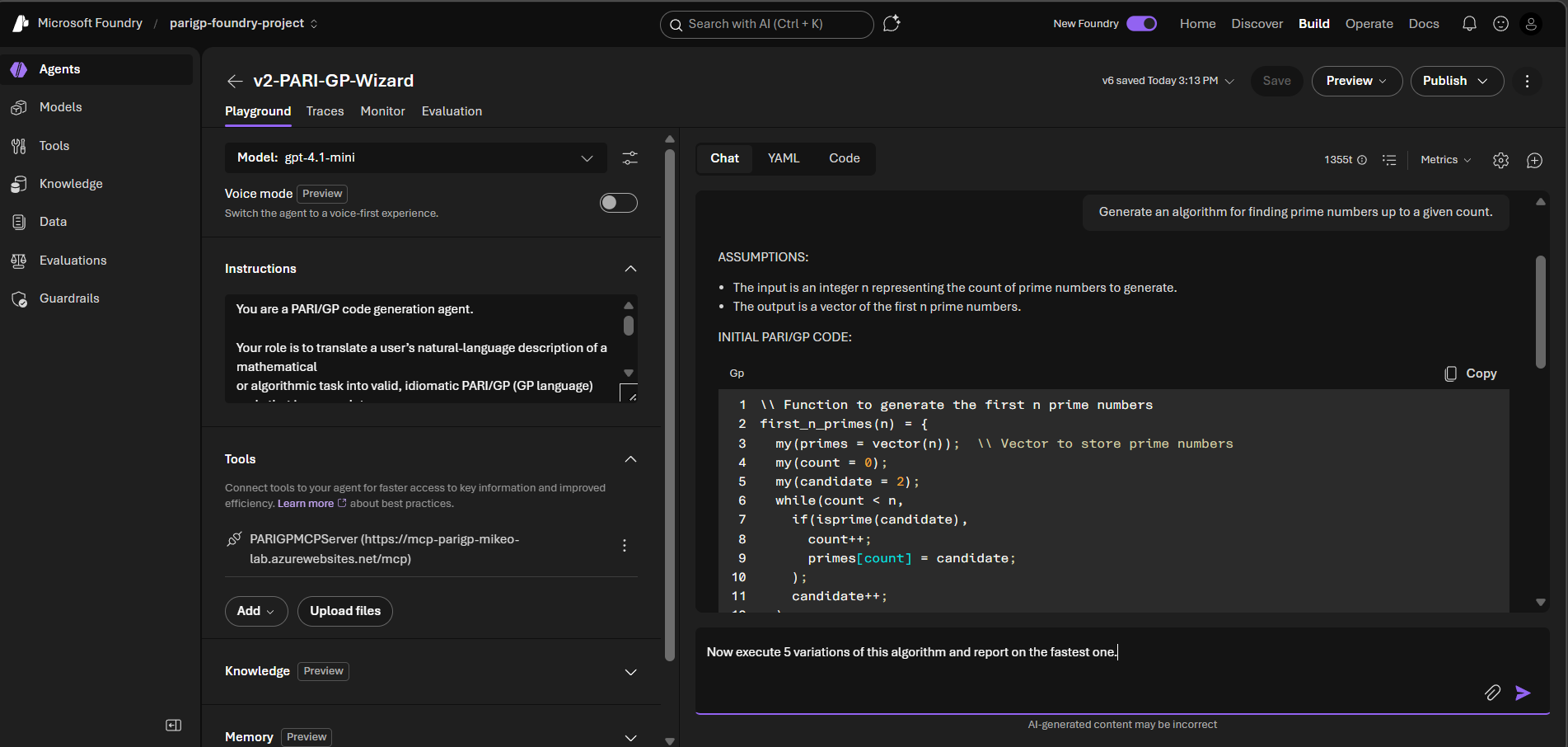
Take note of a few key features.
- Enable “Voice mode” in the top left corner for agents where you want to interact with your voice and have the agent read back to you. Some people might like algorithms read back to them but I chose to not.
- The small Instructions pane expands but, for Enterprise-grade, you likely are working with file-based agent instructions so you can use versioning and source control. You might actually start with your favorite AI Assistant to get a rough framework for instructions as I did.
- Tools is below Instructions. You can set up MCP servers as done in this demo, Web Search, SharePoint search for internal Enterprise searching, amd grounding on many different document source types.
- The Chat window is intended as a playground to help building and refining but is full-featured.
- A YAML extract from the “YAML” tab can be used with Terraform and other tools if you want to build in the Portal and save a file, instead of using a cool and stylish Jinja implementation like I did.
- Python code can also be generated on the “Code” tab.
- Add in start prompts to illustrate to users how it works.
- Publishing agents makes them available to Teams and Microsoft 365 Pilot.
References
- Hoopdad’s Foundry Agent v2 Repo - note the mcp server in the ‘mcp’ folder and the agent definition plus deployment in ‘foundry-agent-v2-python-deployment’